Swarmpit
Simplifying Docker Swarm Management
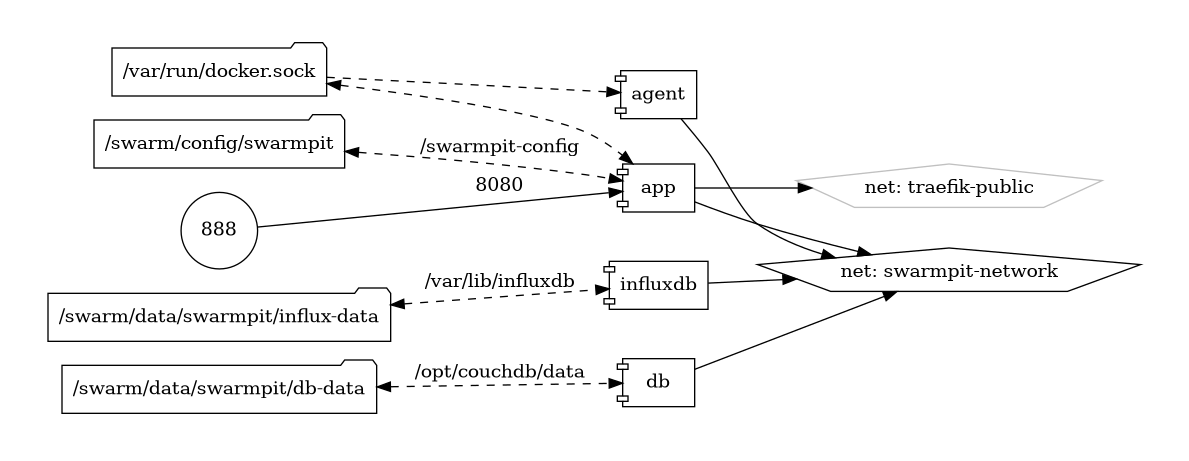
Swarmpit emerges as a user-friendly web-based interface for managing Docker Swarm clusters with unparalleled ease. This open-source solution is designed to simplify the orchestration, monitoring, and deployment of applications within a Docker Swarm environment.
Key Features
-
Intuitive Web Interface: Swarmpit offers an intuitive dashboard that empowers users to effortlessly manage Docker Swarm clusters through a clean and responsive web interface.
-
Application Deployment: Streamline the deployment of services and applications in your Docker Swarm cluster with Swarmpit's straightforward and accessible deployment features.
-
Monitoring and Insights: Gain insights into the health and performance of your Docker services. Swarmpit provides monitoring capabilities and visualizations to ensure optimal cluster management.
-
User and Team Management: Collaborate seamlessly by managing users and teams within Swarmpit, facilitating effective coordination among stakeholders.
Getting Started
Explore the simplicity of Swarmpit by setting up and configuring your Docker Swarm cluster effortlessly. The Swarmpit documentation provides comprehensive guidance for both beginners and experienced users.
Community and Support
Join the Swarmpit community to engage with fellow users, share experiences, and stay informed about updates and enhancements. Swarmpit's open-source nature encourages collaboration and community-driven development.
Discover the convenience and efficiency of Docker Swarm management with Swarmpit—where user-friendly interfaces meet powerful orchestration.
Volumes
Deployment
Run the following command on a docker swarm node
docker run -it --rm \
  --name swarmpit-installer \
  --volume /var/run/docker.sock:/var/run/docker.sock \
  swarmpit/install:1.9
Docker swarm file
configure traefik then deply the stack with traefik parameters, then deploy with shared disks as the following yaml file
Notes
-
delete unused local volumes (may need to reboot the manager first).
-
agent restart policy is 'none' so it wont keep trying to deploy a container on 386 nodes.